

Have you ever wondered what happens inside your computer when you write a simple line of code like if (user.isActive && user.hasPaid)?
The answer might surprise you: billions of tiny switches are turning on and off, millions of times per second.
Let me take you on a journey from the smallest building block of computing to the code we write every day.
It All Starts With a Simple Switch
Imagine a light switch in your home. It has two states: ON or OFF. That's it. Nothing in between.
Now imagine you have billions of these switches, each smaller than a grain of sand, and they can turn on and off millions of times every second.
This is what a transistor is - an electronic switch that controls the flow of electricity.
But here's the interesting part: with just these simple ON/OFF switches, we can build everything. Your smartphone, your laptop, the internet, artificial intelligence - all of it comes down to switches turning on and off.
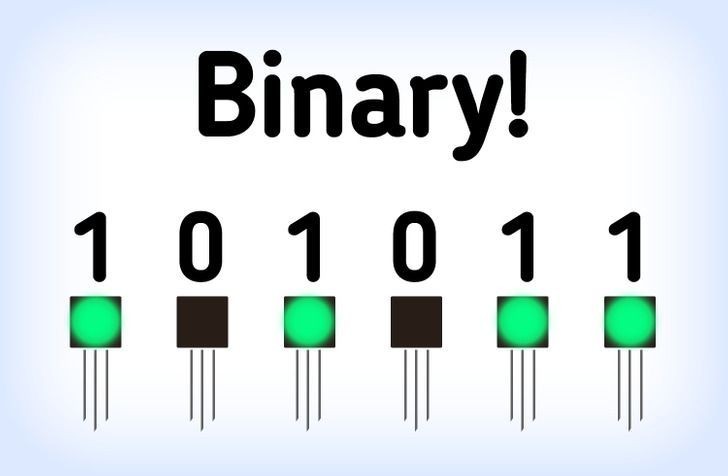 Binary System
Why Only Two States? Why Not More?
You might ask: "Why only ON and OFF? Why not have switches with 3, 5, or 10 different levels?"
Great question! Early computers actually tried this. They built computers with 3 states (ternary) and even 5 states (quinary).
But they discovered a big problem:
- When your battery is low, the signals become unclear
- Electrical noise from other devices causes errors
- At millions of switches per second, it's hard to tell the difference between "medium" and "medium-high"
The solution? Use only two states - as far apart as possible. ON and OFF. This gives us the clearest, most reliable signal.
It's like shouting YES or NO across a noisy room instead of trying to whisper different levels of "maybe."
Binary: The Language of Computers
When we say a switch is ON, we call it:
- 1 (in binary)
- TRUE (in logic)
- Electricity flowing
When we say a switch is OFF, we call it:
- 0 (in binary)
- FALSE (in logic)
- No electricity
This is binary - a system with only two states. And surprisingly, two states are enough to represent anything: numbers, letters, images, videos, even your thoughts in a text message.
How Does a Transistor Actually Work?
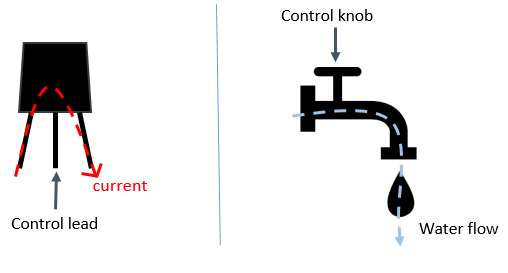 How a Transistor Works
Think of a transistor like a water faucet with three pipes:
- Control pipe (the handle you turn)
- Input pipe (where water comes from)
- Output pipe (where water goes)
When you turn the handle ON → water flows from input to output When you turn the handle OFF → water stops
In a transistor:
- The control wire decides if electricity can flow
- When control is ON → electricity flows through → output is ON
- When control is OFF → electricity stops → output is OFF
This is the basic building block. Now let's see what we can build with it.
Building Logic: The Birth of Computation
Here's where the magic happens. With transistors, we can build logic gates - circuits that make decisions.
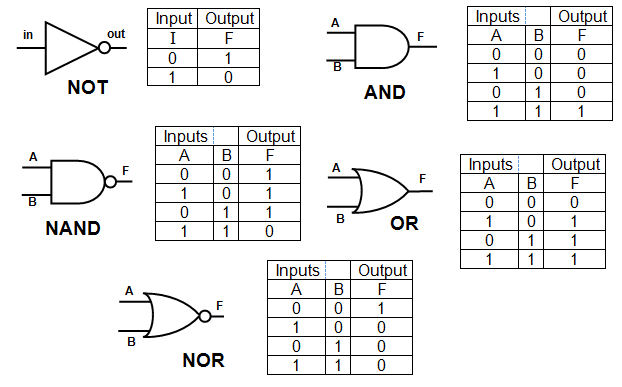 Logic Gates
The NOT Gate (Flip It)
- Input ON → Output OFF
- Input OFF → Output ON
It flips the signal. Simple but powerful.
The AND Gate (Both Must Be True)
- Use 2 transistors in a row
- Both must be ON for output to be ON
- Like saying: "I will go outside IF it's sunny AND it's not raining"
The OR Gate (At Least One Must Be True)
- Use 2 transistors side by side
- If either one is ON, output is ON
- Like saying: "I'm happy IF I have coffee OR I have tea"
From Switches to Software
When you write code like this:
javascriptif (user.isActive && user.hasPaid) { showContent(); }
What's really happening inside your computer:
- Your code gets translated to machine language
- Machine language triggers specific transistors
- Transistors form AND gates to check both conditions
- The result flows through more gates
- Finally, billions of switches working together show content on your screen
All in a fraction of a second.
The Layers of Abstraction
Here's the journey from bottom to top:
Layer 1: Electrons and silicon (physics) Layer 2: Transistors (switches) Layer 3: Logic gates (NOT, AND, OR) Layer 4: Complex circuits Layer 5: Processors and memory Layer 6: Operating systems Layer 7: Programming languages Layer 8: Your application Layer 9: The user experience
Each layer builds on the one below. Each layer hides the complexity of the layer beneath it.
This is the genius of computer science - we've built abstraction so well that you can create an app without thinking about transistors. But they're still there, working tirelessly.
One Final Thought
The next time you write code, remember this:
- Every variable you create
- Every function you call
- Every loop you run
Is ultimately billions of tiny switches turning on and off in perfect harmony.
From a simple ON/OFF switch to artificial intelligence - that's the magic of binary, transistors, and the beautiful layers of abstraction we've built on top of them.